Afri Invoice Dashboard is your real time financial command centre, giving you instant clarity on revenue, outstanding invoices, overdue payments, and customer behaviour the moment you log in. It replaces spreadsheets, guesswork, and manual tracking with a single, intelligent view of everything happening in your business.

Key Metrics at a Glance

The dashboard surfaces the financial data that matters most, updating the moment anything changes.
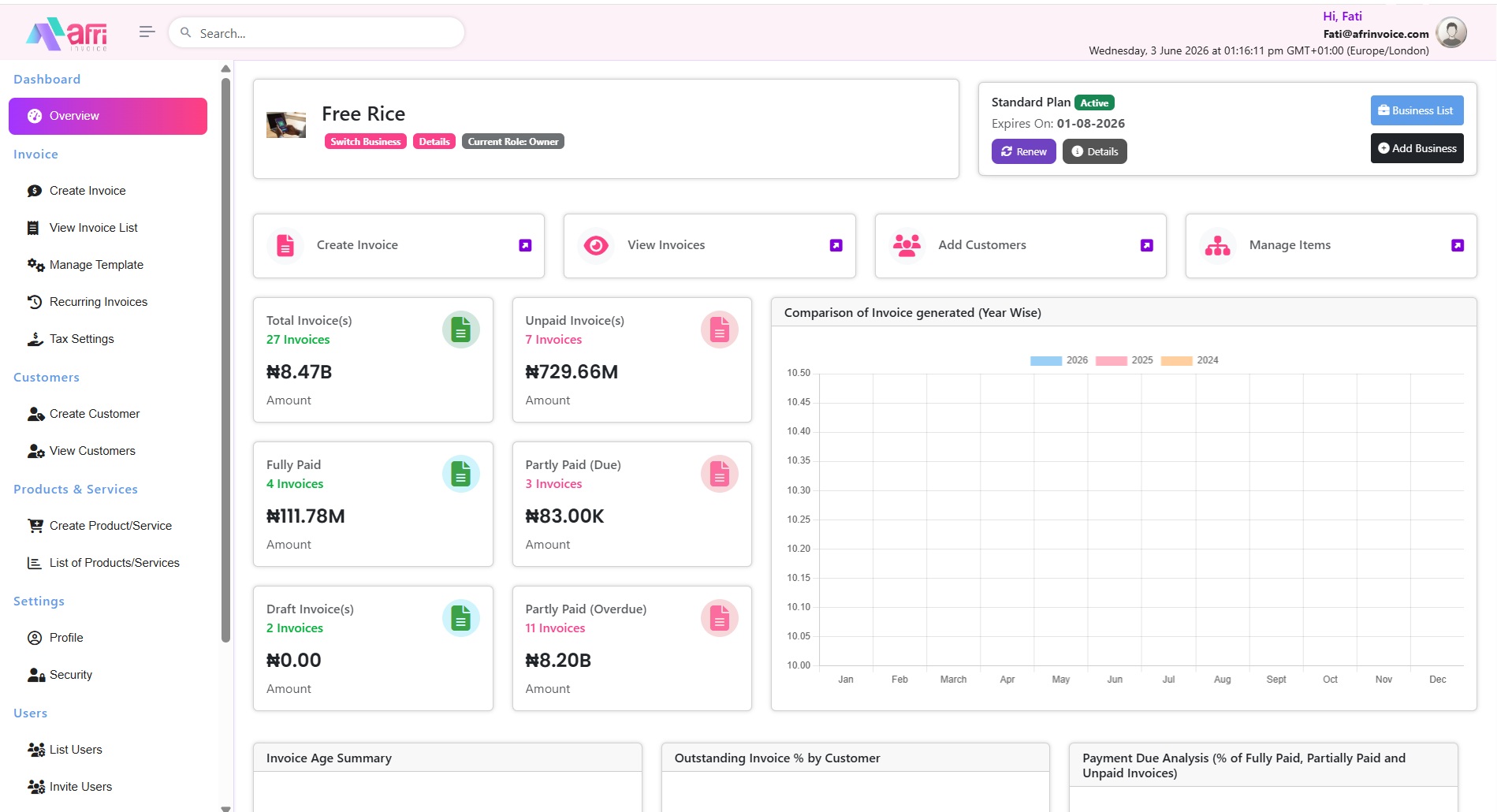
Total Invoices Sent a running count and total value of every invoice issued across your account.
Payments Received track confirmed income and identify what remains outstanding by customer or date.
Outstanding Balances overdue and due amounts separated into ageing buckets, so you know who to chase first and for how much.
Recurring Invoices monitor all automated or scheduled invoices without opening each one individually.
Top Customers instantly identify your highest-value clients and track how much revenue they represent.
Dashboard

Live Updates and Visual Analytics

Every figure on your dashboard updates in real time as invoices are created, edited, paid, or submitted to the Nigerian Revenue Service.

Donut charts for invoice age summary, pie charts for payment status, and bar charts for year-on-year comparison.
Quick action buttons Create Invoice, View Invoices, Add Customer, Manage Items, reduce navigation to a single click.
Multi-business toggle switch between all your registered business profiles without logging out, each with its own dedicated dashboard view.

Built for Nigerian Business Realities

Naira-First Display amounts are shown in ₦ by default, reflecting each business profile's assigned currency.
Role-Based Views business owners see full analytics; accountants and assistants see only the data their role permits.
Mobile Responsive the full dashboard is accessible on desktop, tablet, and smartphone, no separate app required.
NRS Compliance Indicator a visual confirmation that your most recent invoices have been stamped and submitted to the Nigerian Revenue Service.

Frequently Asked Questions

Does the dashboard show data from all my businesses?

Each business profile has its own dashboard view. Use the multi-business toggle to switch between them instantly. Each entity's figures are completely separate.

How often does the dashboard update?

All figures update in real time. The moment an invoice is created, edited, or a payment is recorded, your dashboard reflects it immediately.

Can my accountant see the same dashboard I see?

Your accountant can see the financial data their role permits. Full analytics, including billing and account settings are reserved for the Primary account holder and Admin users.

Sign up

No credit card required. Set up in under 3 minutes.

Chat Now